Monthly SEO snapshot
A compact view per client: KPI changes, moving pages, query opportunities, and technical crawl signals.
SEO Reporting Software for Agencies
WebHealth helps agencies turn GSC, GA4, and crawl data into a prioritized action plan for client meetings, not just another reporting archive.
For small SEO and digital agencies managing multiple client websites.
Connects GSC, GA4, and crawl signals into monthly snapshots.
Turns anomalies into a prioritized action list.
Does not replace specialist SEO tools; it adds a decision layer above them.
Problem
Many SEO reports are still assembled from several exports: Search Console for clicks, impressions, and queries, GA4 for sessions and landing pages, a crawl for technical issues, then manual sorting into slides or spreadsheets. The output looks like work, but often fails to answer the client question that matters most: what should we do next, and why in this order?
A useful monthly report answers four questions for the client meeting. Everything else is data clutter.
WebHealth orders GSC, GA4, and crawl data in that sequence: from change to prioritized action.
Interactive demo
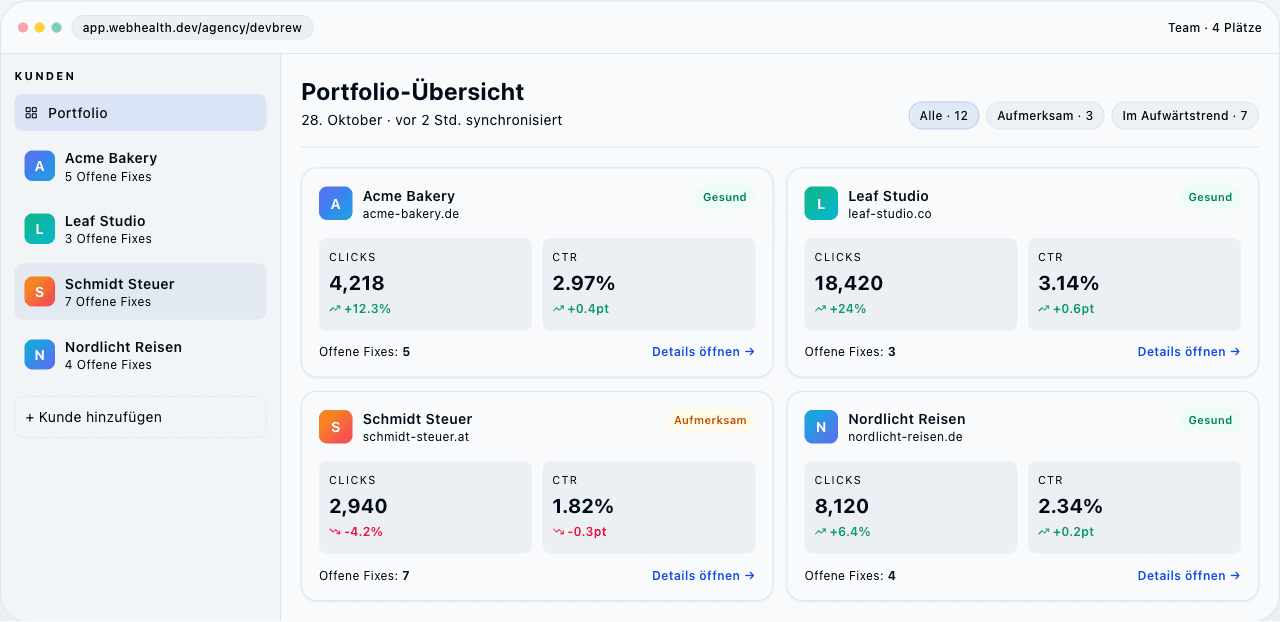
The demo shows the agency flow WebHealth is built around: start with a portfolio overview, open a client site, then review prioritized actions with expected impact. In the pilot, this flow is set up founder-led so we can learn from real agency processes before scaling it wider.
Fictional sample data, not customer results.
October 28 · auto-synced 2 hours ago
Pilot output
A compact view per client: KPI changes, moving pages, query opportunities, and technical crawl signals.
A prioritized list for your team, so reports do not stop at charts and can move into implementation.
A clear summary of what changed, what matters, and which next steps you can explain with confidence.
Before Webhealth vs. after
What a 10-client agency usually spends on exports, formatting, and "what should we do next?" calls.
Manual snapshot work
3–5 hours pulling GSC + GA4 data, formatting slidesWith Webhealth
3 minutes — scheduled, automatedManual snapshot work
GSC export, GA4 export, crawl tool, Looker by handWith Webhealth
GSC + GA4 + live crawl joined for youManual snapshot work
Written from memory after each callWith Webhealth
Prioritized P1/P2/P3 with URLs and impactManual snapshot work
Cleaned slides, 1 per deliverableWith Webhealth
Branded PDF or link, per client, on a scheduleManual snapshot work
When someone eyeballs the line chartWith Webhealth
Flagged automatically with signed deltasManual snapshot work
~30 minutes of admin per propertyWith Webhealth
2 clicks — property already discovered via GoogleWebHealth does not replace professional SEO research, keyword tooling, or deep technical crawling. It sits above those signals and turns recurring reporting into a decision layer for agencies: what is relevant, what is urgent, and what belongs in the next client meeting?
No. The first month of the Founding Agency Pilot is free for qualified agencies. If the workflow is useful after the first monthly snapshot, we send the payment link for the EUR 149/month founder rate.
In the pilot, the first deliverable is an agency-branded monthly snapshot with client-ready summary copy. White-label is visible because agencies need it, but the pilot is mainly about turning data into a ranked action plan.
The core connected-data flow is positioned as EU-hosted. Any extra agency controls that still need implementation are tracked separately in the follow-up note.
No. WebHealth sits above the reports and tools you already use. It connects GSC, GA4, and crawl signals into evidence-backed recommendations and a ranked action backlog.
Looker Studio is useful for dashboards and recurring views. WebHealth is the decision layer above GSC, GA4, and crawl signals: it highlights what changed and turns it into a ranked action backlog for review.
The pilot is built around one monthly snapshot per connected client site. Early pilot delivery is founder-led, while scheduled automated delivery remains a visible rollout target.
WebHealth works with the Google properties your connected account can read. The product already handles the agency flow around discovered GSC and GA4 properties; edge cases are reviewed during pilot setup.
Yes, the agency pilot is designed for multiple client sites in one workspace. Granular per-client permissions are still labeled as follow-up product work, not as a finished control surface.
The connected-data core is positioned as Germany-hosted on a local hosting provider. The legal pages describe processing details and subprocessors.
The pilot starts with a short fit check and founder-led setup for 3-10 client sites. Property selection is intentionally reviewed with you so the first monthly snapshot is useful, not just connected.
Book the pilot fit check. We set up the first 1-3 client pages together and turn the workflow into something usable for your next client update.